An iPhone app that helps you pay off credit cards and loans

The date
your debt ends

Jun 25, 2027

Type in what you owe. Circled works out the day it ends when you pay one fixed amount every payday — and shows you that date before you pay for anything.

Launch news by email — unsubscribe anytime. · iPhone, iOS 18+ · 7-day free trial

The Reveal: Jun 25, 2027 circled in vermilion — riding the minimums has no end date; this plan does. 9 paychecks from now, revolving-free, total interest shown.

The trap

Paying the minimum is designed to never end.

Pay only the minimum and a credit card is built to keep you paying for years. The balance barely moves; the interest keeps coming. Circled does the opposite. You pay the same amount every payday. When one card is paid off, its payment moves to the next card. Keep going and you get something a minimum payment never gives you: a finish date.

your date still in debt, years later today
Paying only the minimum One fixed payment every payday

How it works

Two minutes to get your date. Thirty seconds a payday to keep it.

1

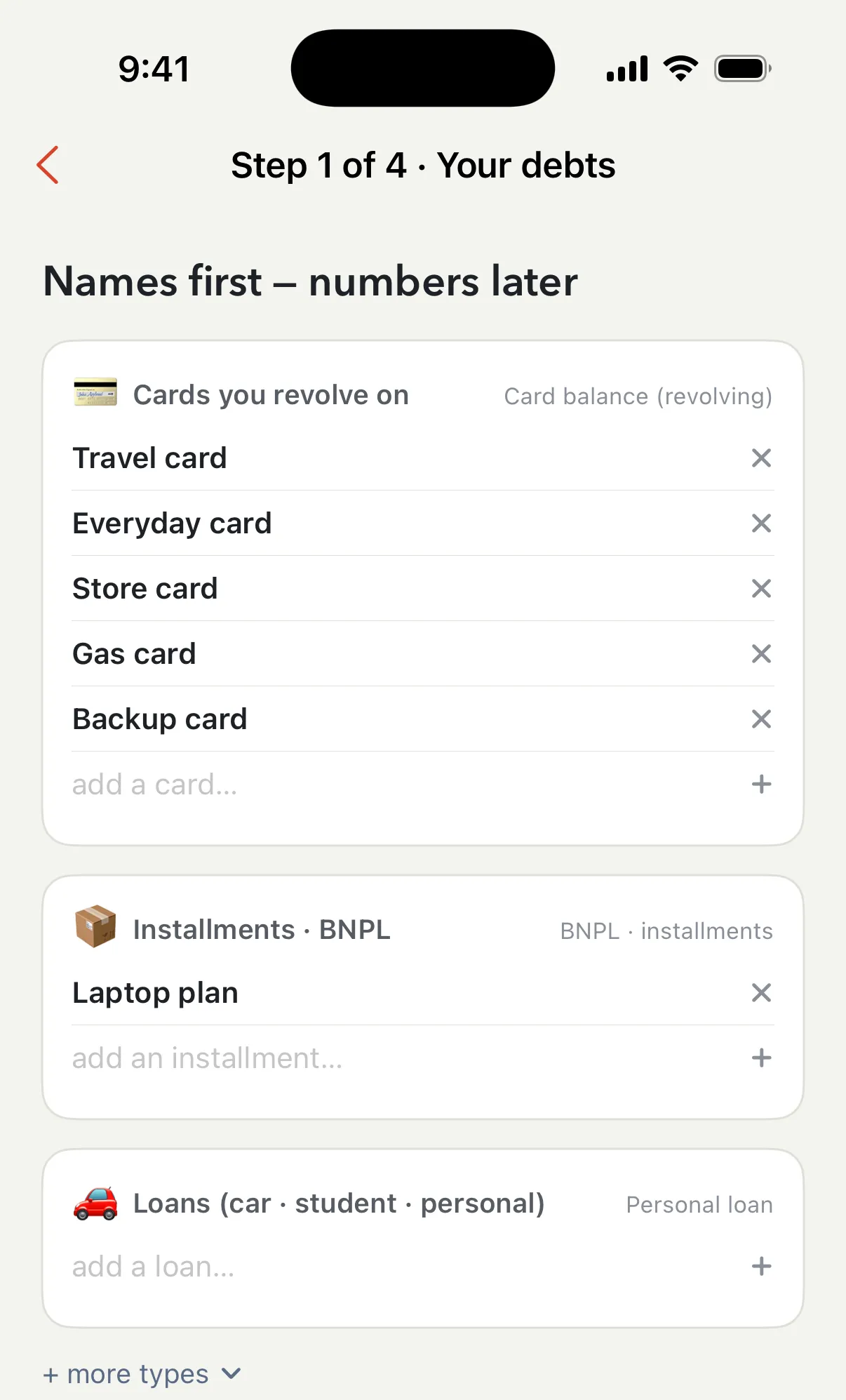
Type in your debts

Credit cards, buy-now-pay-later plans, car and student loans — call them what you call them. Under two minutes. No account, no bank connection. Your plan stays on your iPhone.

Setup step 1: Travel card, Everyday card, Store card, Gas card, and Backup card named under Cards you revolve on; Laptop plan under Installments
2

See the day your debt ends

Circled works through your plan payday by payday: the same payment every time, and when a card is paid off its payment moves to the next one. It circles the day it all ends and shows the total interest before you decide anything.

The Reveal: the computed date circled in vermilion, total interest $1,127 beneath
3

Log what you spend, check in on payday

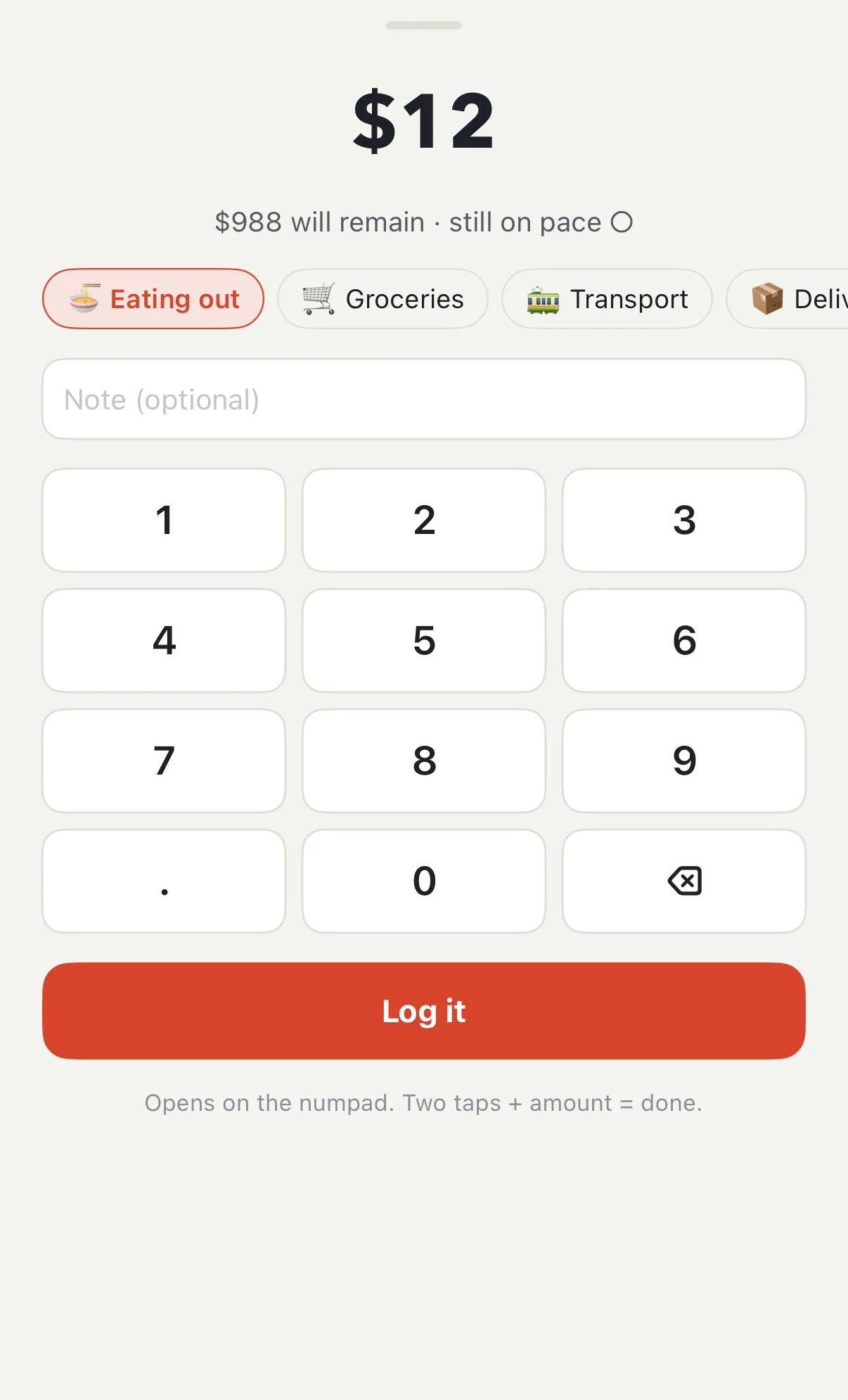
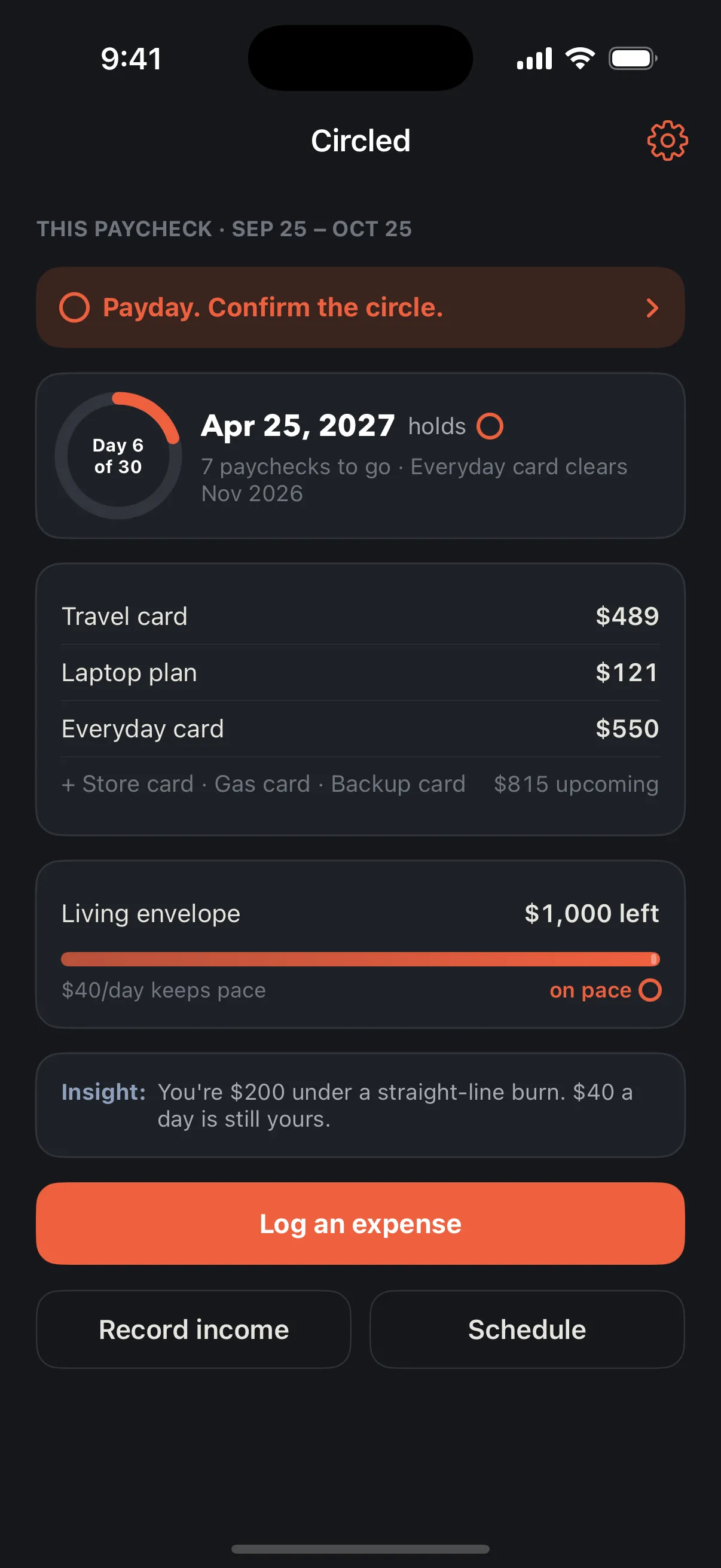
Day to day, two taps per purchase — Circled shows what’s left until payday, so the fixed payment is always covered. On payday, 30 seconds: confirm the payments went through, and if real life changed the numbers Circled recalculates and gives you a true new date. That’s how you keep it circled.

The quick-log sheet: $12 typed on the numpad, Eating out selected, “$988 will remain · still on pace ○”, a Log it button

The schedule

In this example: nine paychecks, then it’s done.

A list, payday by payday: what to pay on each card, which payday clears which card (it gets a ○ when it does), and the last line — everything paid, with a real date on it.

Schedule in dark mode: the next payday, Oct 25 2026, lists each card's payment and new balance; below it one row per payday, with a ○ on every payday that clears a card

Features

Built for real life

Any payday schedule

Paid monthly, twice a month, every two weeks or weekly — the plan follows your real paydays.

Two-tap spending log

Amount, category, done. A daily reminder that stays quiet on days you've already logged.

Apple Pay logs itself

After a one-time setup Circled walks you through, purchases you make with Apple Pay can log themselves. You just pick the category.

Circled AI

Snap the receipt

Point the camera at the bill. Circled AI reads the total and the shop, you confirm, and it’s logged — lunch takes one tap.

Circled AI

Ask Circled AI

“What did I spend most on last month?” “What if I cut eating out by $100?” Answers from your own numbers, with the date they imply.

Your bills, line by line

Rent, subscriptions, the car payment. A payment that ends next year counts as ending next year.

Extra income counts

Bonus, side gig, a hand from family — record it, choose which debt it goes to, and watch your date move closer.

Rewards only for real progress

A stamp for every payday, a seal for real milestones. No streaks to lose, no fake prizes.

Privacy, stated plainly

Your plan stays on your iPhone.

Circled never asks for a bank login, and your plan — every balance, payment and date — lives on your iPhone, not on a server of ours. Circled AI is the one thing that leaves the phone: a receipt you scan, or a question you ask together with the spending it needs, goes to Circled’s server and the AI service behind it to be read, then comes back. Circled doesn’t keep it.

  • No account or sign-up inside the app
  • No bank connection — you type your numbers instead
  • Your plan is yours — export it as a file, any time
  • Circled AI reads only what you send it; Circled doesn’t store it, and it isn’t used to train anyone’s AI — the provider is named in the privacy policy

Pricing

Try it free for 7 days.

Circled is an app you use yourself — nobody at Circled touches your accounts or talks to your lenders. Two plans, both with a 7-day free trial:

Save up to 33% with yearly

7-day free trial on both plans — no payment due today

Circled
$5.99 / month

For paying off your cards and loans by a date you can see.

Join the launch list

Includes:

  • Your date, plan and payday schedule
  • Payday check-ins and recalculation
  • Two-tap spending log, reminders
  • Apple Pay logs itself
  • Cancel anytime in Settings
Circled AI
$7.99 / month

For logging in seconds and asking questions about your own numbers.

Join the launch list

Everything in Circled, and:

  • Snap the receipt — read and logged
  • Ask Circled AI about your spending and your date
  • Fair-use limits on scans and questions

Yearly plans are billed once a year: $71.99 for Circled, $95.99 for Circled AI.

Your date is yours free, forever. Without a subscription — after the trial — your circled date, plan and schedule stay on screen, view-only.

With a subscription: payday check-ins, spending log, Apple Pay logging, reminders, recalculation, editing your plan — and with Circled AI, receipt scanning and Ask Circled AI.

Billing goes through Apple. After the free week the plan you picked starts unless you cancel in your iPhone settings.

Questions

Fair questions, straight answers

Does Circled pay my debts for me?

No. Circled is a plan you follow. Each payday it tells you what to pay on which card and the day you’ll be done; you make the payments the way you do now.

Does it connect to my bank?

No — by design. You type your balances once and confirm them each payday; it costs about two minutes and means no bank credentials, no aggregator, and your plan is never uploaded. The payday confirmation is also the point — a plan you touch is a plan you keep. If we ever offer a bank connection, it will be optional, off by default, and never required to keep your date.

Does Circled AI see my numbers?

Only what you send it. A receipt you scan, or a question with the spending summary needed to answer it, goes to Circled’s server and on to the AI service we use, is read, and comes back. Circled doesn’t store it, and the service’s business terms rule out using it to train their models — the provider, what it receives and how long it keeps logs are spelled out in the privacy policy. Your plan itself — balances, payments, the date — is never uploaded. The Circled plan has no AI features at all.

Which debts can it plan?

Credit card balances you carry month to month, buy-now-pay-later and installment plans, overdrafts and credit lines, and loans — car, student, personal. Each kind is calculated the way it really works, with the names used in your country.

Do I need to know my interest rates?

It helps. Your statement or your card’s app shows the rate (APR). If you don’t have it, Circled starts with a typical rate for that kind of debt in your country and you can correct it later.

What about my mortgage?

Deliberately excluded from the debt plan — a 30-year loan would make any "debt-free date" meaningless. Track it as a fixed bill with an end date instead; your circled date is for debts you can actually finish.

Is this financial advice?

No. Circled is planning software: it computes what your own numbers imply under fixed payments. It doesn't recommend products, negotiate rates, or promise outcomes. For advice about your situation, talk to a qualified adviser.

iPhone only?

At launch, yes — iPhone with iOS 18 or newer, in nine languages: English, Japanese, German, Dutch, French, Swedish, Norwegian, Danish and Arabic. Android follows after the iPhone app is stable, not in parallel; we’d rather ship one excellent app than two mediocre ones.

What happens to my data if I stop paying?

Nothing bad. The app switches to view-only: you can still see your date and plan, the tools lock. Your plan stays on your device, and you can save it as a file whenever you want.